Add a shared mailbox to Outlook mobile

Add a shared mailbox to Outlook mobile

If you use Outlook for iOS or Outlook for Android, you can add a shared mailbox you have permissions to access on Outlook Mobile.

Use a shared mailbox on a mobile device (phone or tablet)

To access a shared mailbox on a mobile device, use the following steps. 

  1. Sign in to your primary account in Outlook for iOS or Android.

  2. Tap the Add Account button in the left navigation pane, then tap Add a Shared Mailbox
    Add an account to the Outlook app

  3. If you have multiple accounts in Outlook Mobile, select the account that has permissions to access the shared mailbox. 
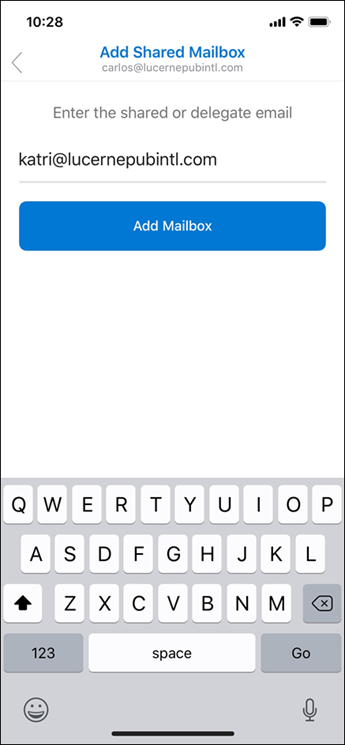
    Enter your email address.

After the account setup process completes, the shared mailbox will display in your account list in Outlook for iOS or Outlook for Android. 

To remove a shared mailbox, go to Settings Accounts. Then tap on the shared mailbox and select Delete Account

    • Related Articles

    • Send E-mail from Shared Mailbox

      Choose New mail above the folder list. A new message form opens in the reading pane. At the top of the message, choose > Show From. This option shows you that the people who receive the email message will see it comes from the shared mailbox and not ...
    • How to Add Your Allied Email to Outlook Mobile (iOS & Android)

      This guide walks you through adding your Allied Steel email account to the Microsoft Outlook mobile app. ✅ Before You Begin Ensure you know your Allied email address and password Make sure Outlook Mobile is installed Remove any old Google accounts if ...
    • Open Shared Mailbox in a Separate Window

      Use this method if you want to view and manage the email for the shared mailbox in its own browser window. This method also lets you receive notifications of new items in the Inbox of the shared mailbox. Sign in to your account in Outlook on the web. ...
    • How to use a Shared Calendar

      One of the great things about using a shared mailbox is that anyone who has access to the shared mailbox also has full access to the calendar. You can create, edit, and delete events in the calendar. Use the shared calendar just as you would use your ...
    • (Windows) Remove Google Account from Outlook for Desktop

      Need to update and add instructinos to do so from within Outlook App Open Control Panel Select Mail (Microsoft Outlook) Click Email Accounts Select your Google account Click Remove Confirm