Send E-mail from Shared Mailbox
Choose New mail above the folder list. A new message form opens in the reading pane.
At the top of the message, choose
 > Show From.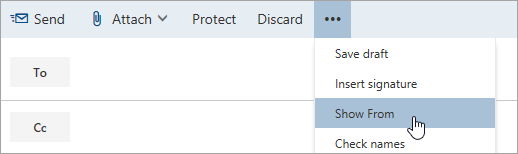
This option shows you that the people who receive the email message will see it comes from the shared mailbox and not from your own email account.
The first time you use the shared mailbox, you need to add the address to the options available in the From drop-down list:
Right-click the From address and choose Remove.
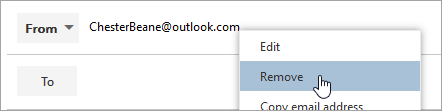
Type the shared address. The next time you reply from the shared mailbox, its address will appear as an option in the From drop-down list.
To add recipients, type the name of anyone who is in your contacts folder or organization’s address list, or type the email address in the To or Cc box. The first time you enter a person’s name, Outlook on the web searches for that person’s address. In the future, the name is cached so it resolves quickly.
Type a subject.
Type the message you want to send.
When your message is ready to go, click Send.
Related Articles
What is E-mail Spoofing?
What is Email Spoofing? Email spoofing is the fabrication of an email header in the hopes of duping the recipient into thinking the email originated from someone or somewhere other than the intended source. Because core email protocols do not have a ...Add a shared mailbox to Outlook mobile
Outlook for iOS If you use Outlook for iOS or Outlook for Android, you can add a shared mailbox you have permissions to access on Outlook Mobile. Use a shared mailbox on a mobile device (phone or tablet) To access a shared mailbox on a mobile device, ...Open Shared Mailbox in a Separate Window
Use this method if you want to view and manage the email for the shared mailbox in its own browser window. This method also lets you receive notifications of new items in the Inbox of the shared mailbox. Sign in to your account in Outlook on the web. ...How to link Microsoft 365 E-mail in Zoho CRM
1) Navigate to crm.zoho.com 2) Click the Settings gear in the top right corner 3) Click "Email" under Channels 4) Click the "Email" tab and then click "Get Started" 5) Click Office365 6) Click Configure 7) Click your Allied email account 8) If ...How to use a Shared Calendar
One of the great things about using a shared mailbox is that anyone who has access to the shared mailbox also has full access to the calendar. You can create, edit, and delete events in the calendar. Use the shared calendar just as you would use your ...